

Offer a Bonus as an Incentive
|
Access Your Affiliate Dashboard: Head over to your affiliate dashboard and select the product you want to promote.
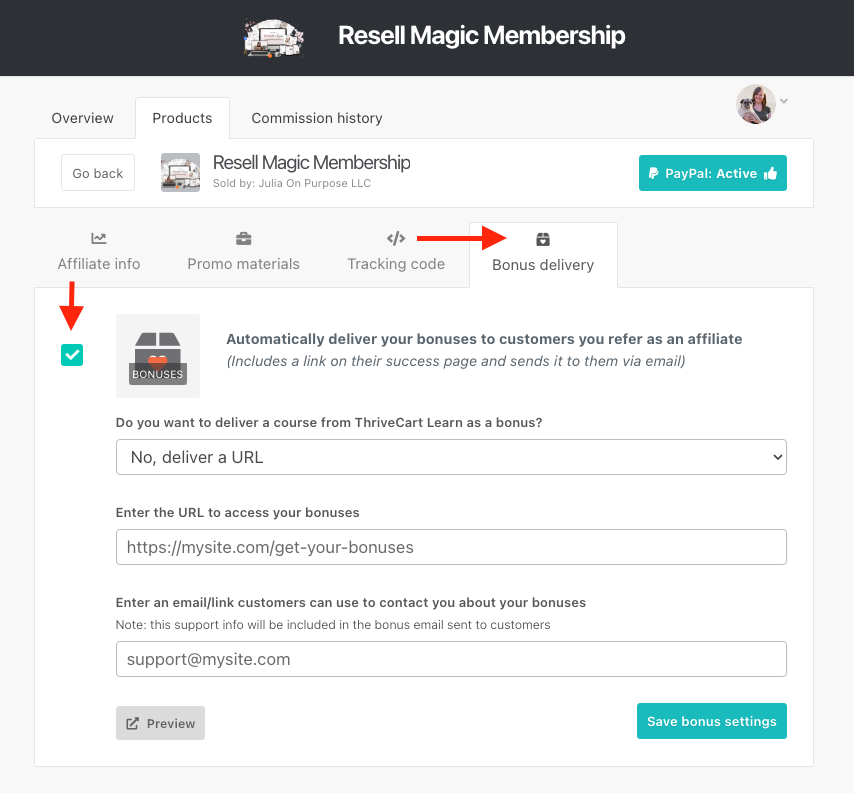
Enable Bonus Delivery: Navigate to the "Bonus Delivery" tab and enable "Automatically deliver your bonuses to customers you refer as an affiliate."
Enter Bonus Details: Enter a URL where customers can access the bonuses. This is typically a webpage on your site with access to the content or a page detailing the customer's next steps.
Provide Support Contact: Optionally, enter your support contact email or URL so referred customers can reach out to you if needed.
Once saved, ThriveCart will automatically send an email to the customer after their purchase with the bonus details.
"If you purchase [INSERT PRODUCT/S] through my affiliate link, you’ll also get [INSERT BONUS HERE - e.g., FREE access to an e-book, a FREE 30-minute strategy call with me, etc.]"
Helpful Thrivecart Article: Automatically fulfilling your bonuses